top of page
Step 1
Click download (on a Windows PC or laptop not on mobile).
Then click "Download Anyway" if you get a warning from your web browser. For reassurance please note our external reviews at Trustpilot.
Warning you must install this code as administrator for the code to work.
.png)
Step 2
Go to downloads and find a zipped file called Windows MICLIGHT Setup
.png)
Right click on it and choose extract all.

Leave the location in downloads for easy finding. And click extract.
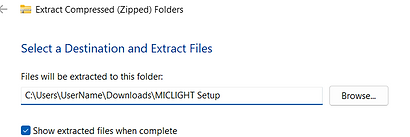
Now look in that location. There will be a new folder called Windows MICLIGHT Setup
.png)
In the new folder will be a file called "Windows MICLIGHT Setup. Exe"
.png)
Right click this file and click run as administrator.
You may need to enter your administrator password to do this. If you skip this step the program will not load up automatically on restart and the Mic Light will not function. If you installed and did not do this uninstall MicLight.exe and start again.

Step 3
This window will then open
Click more info.

Step 4
That'll reveal the run anyway option.
Click run anyway.

Step 5
Click yes on this window

Step 6
Read the agreement and
click "I accept the
agreement" if you are happy to abide by its terms. Then click Next

Step 7
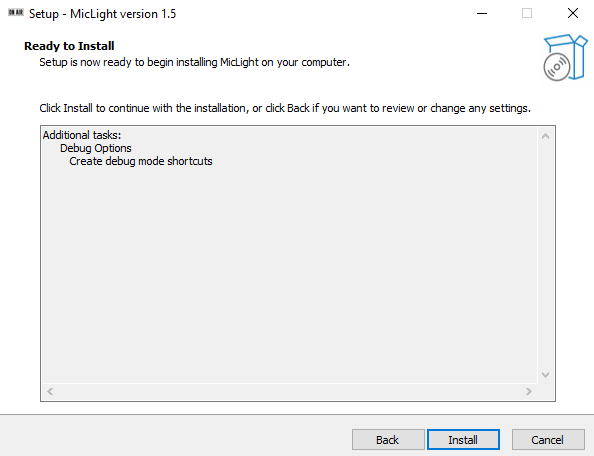
Click yes on debug mode shortcuts.
This is an additional program you can open to check if the program is connecting to the Mic Light and can find your microphone. It is not the main program which after installation does not require manual opening or running.

Step 8
Check you're happy then click install.
Step 9
Click finish

These next steps show how to test the Mic Light quickly and easily.
Step 10
Plug the Mic light to the PC with the cable.
DO NOT ATTEMPT TO FORCE IN CABLE!
Cable should look like this.

It should flash once. If it doesn't try the didn't flash page.
Step 11
Right click the speaker icon on your base right toolbar.

Step 12
This or a similar menu will open click open sound settings.

Step 13
That will cause this menu to open it should show a listed input microphone and the blue bar under it should move when you make noise. The white microphone icon should also appear on your screen in the same taskbar the sound settings were in.
Step 14
Leave this window open the Mic Light should turn on. If it doesn't leave it open and wait a few minutes. Then try unplugging and replugging the Mic Light (wait 5 mins initial connection can take a little while).
If still not activating then check either our advanced troubleshooting or our common issues


bottom of page